🍓 Raspberry Plant Spacing Calculator
Calculate exactly how much space your raspberry plants need based on variety, growing method, and garden size
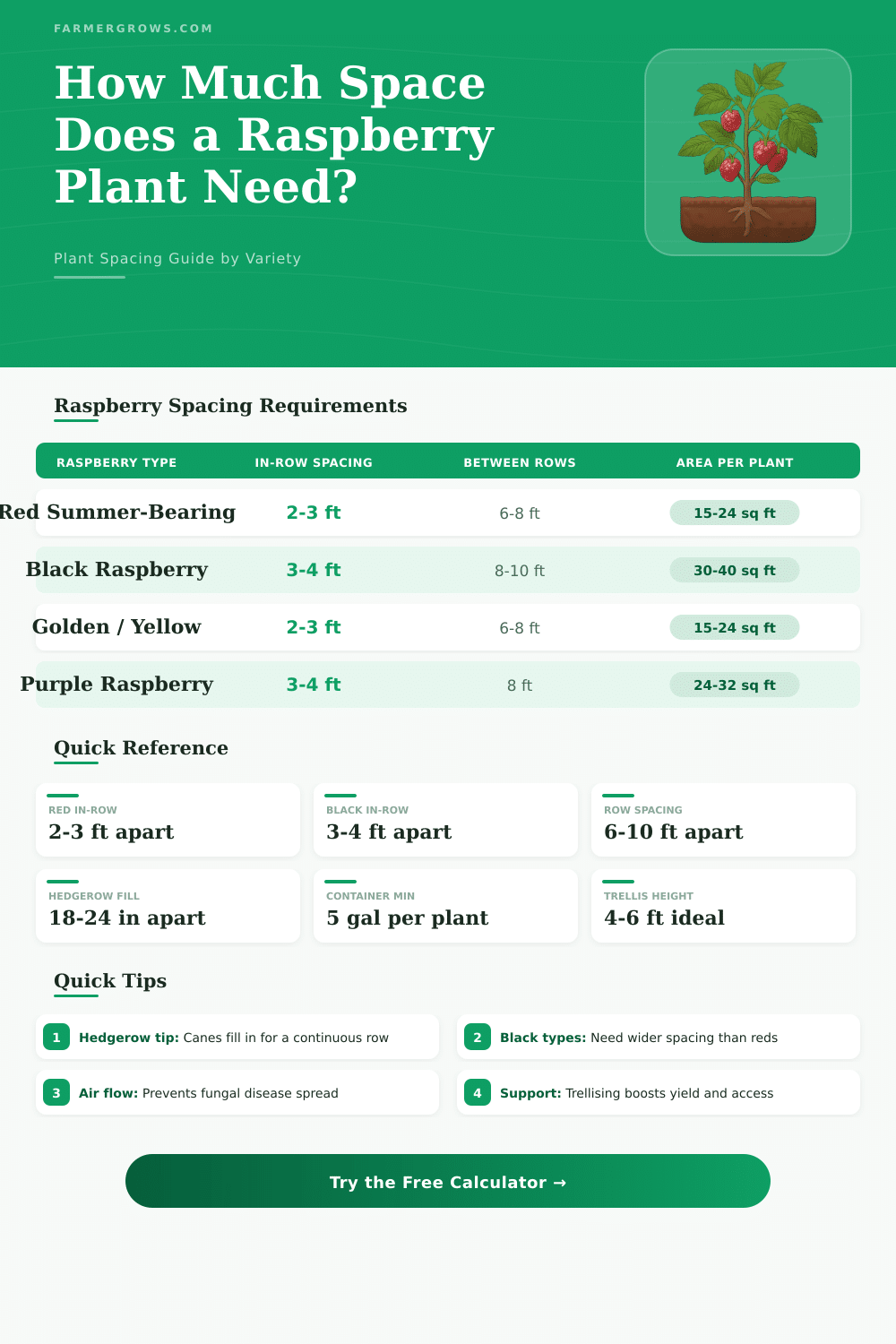
| Raspberry Type | Method | In-Row Spacing | Between Rows | Area Per Plant |
|---|---|---|---|---|
| Red Summer-Bearing | Hedgerow | 1.5–2 ft (45–60 cm) | 6–8 ft (1.8–2.4 m) | 12–16 ft² |
| Red Summer-Bearing | Hill System | 2–3 ft (60–90 cm) | 6–8 ft (1.8–2.4 m) | 15–24 ft² |
| Red Everbearing | Hedgerow | 1.5–2 ft (45–60 cm) | 6–8 ft (1.8–2.4 m) | 12–16 ft² |
| Red Everbearing | Raised Bed | 2–2.5 ft (60–75 cm) | 3–4 ft (0.9–1.2 m) | 8–10 ft² |
| Black | Hill System | 3–4 ft (90–120 cm) | 8–10 ft (2.4–3 m) | 30–40 ft² |
| Black | Hedgerow | 2.5–3 ft (75–90 cm) | 8–10 ft (2.4–3 m) | 24–30 ft² |
| Golden / Yellow | Hedgerow | 1.5–2 ft (45–60 cm) | 6–8 ft (1.8–2.4 m) | 12–16 ft² |
| Golden / Yellow | Hill System | 2–3 ft (60–90 cm) | 6–8 ft (1.8–2.4 m) | 15–24 ft² |
| Purple | Hill System | 3–4 ft (90–120 cm) | 8 ft (2.4 m) | 24–32 ft² |
| Any Type | Container | N/A | N/A | 1 plant per 5+ gal |
| Support Type | Best For | Height | Wire Spacing |
|---|---|---|---|
| T-Trellis | Summer-bearing reds, everbearing | 4–5 ft (1.2–1.5 m) | 2 wires at 2 ft and 4 ft |
| V-Trellis | High-yield hedgerows | 5–6 ft (1.5–1.8 m) | Angled arms, 2–3 wires |
| Single Wire | Small plantings, everbearing | 3–4 ft (0.9–1.2 m) | 1 wire at 3–4 ft |
| No Support | Black and purple (tip-rooting) | N/A | N/A |
| Raspberry Type | Min Container Size | Recommended Size | Plants Per Container |
|---|---|---|---|
| Red Summer-Bearing | 5 gallon (12 in wide) | 7–10 gallon (16–18 in) | 1 |
| Red Everbearing | 5 gallon (12 in wide) | 7–10 gallon (16–18 in) | 1 |
| Black | 7 gallon (14 in wide) | 10–15 gallon (18–20 in) | 1 |
| Golden / Yellow | 5 gallon (12 in wide) | 7–10 gallon (16–18 in) | 1 |
| Purple | 7 gallon (14 in wide) | 10–15 gallon (18–20 in) | 1 |
| Garden Size | Hedgerow Plants | Hill System Plants | Expected Yield |
|---|---|---|---|
| 4 × 8 ft (1.2 × 2.4 m) | 4–5 | 2–3 | 4–12 lbs |
| 4 × 12 ft (1.2 × 3.7 m) | 6–8 | 4–5 | 8–20 lbs |
| 8 × 20 ft (2.4 × 6.1 m) | 10–13 | 6–8 | 12–32 lbs |
| 10 × 20 ft (3 × 6.1 m) | 10–13 | 6–8 | 12–32 lbs |
| 20 × 30 ft (6.1 × 9.1 m) | 15–20 | 10–14 | 20–56 lbs |
| 50 × 50 ft (15 × 15 m) | 50–80 | 35–50 | 70–200 lbs |
Raspberry Pi computers successfully entered the range of the cosmos. In 2015, two special Raspberry Pi B+ devices, adapted for space, reached the International Space Station. That happened thanks to work with the ESA.
They arrived with sensors for surroundings and a Raspberry Pi camera module for watching the Earth. The Raspberry Pi Foundation prepared those two unique units called Astro Pi, for running student programs on board the ISS.
Raspberry Pi in Space
The European Astro Pi Challenge is an educational project of the ESA, that works together with the Raspberry Pi Foundation. It allows young people to do scientific tests in the cosmos by making computer codes. Those programs run on the Raspberry Pi machines aboard the ISS.
The Astro Pi Mission Space Lab opens often, giving juniors across Europe the chance to send their code for scientific tsets in space on the station.
The new Astro Pi units each carry a Raspberry Pi computer with a high quality camera and group of sensors. Everything sits in a separate box ready for cosmos, that adapts the hardware for use on the station. Quite a trip four a little computer.
Except the ISS, Raspberry Pi devices also found use on satellites. GASPACS is a CubeSat whose main task is to test the opening of an experimental inflatable antenna. It also checks whether that antenna helps the satellite to stay stable.
The CubeSat got sent to the ISS in low orbit of the Earth and sent photos taken by a Raspberry Pi camera back to our planet. The inflatable antenna opened successfully.
Raspberry Pi boards usually serve for prototype work. Industrial versions of the same hardware are available too. In the design stage, one can build a test satellite using parts that will later be used in orbit.
Later teams pass to industrial versions, when everything is ready for flight.
Projects with high balloons also raised Raspberry Pi units to almost space. The Project Trinidad used Raspberry Pi to capture images and gather data from the stratosphere at 42 kilometers height. Launching a Raspberry Pi with a camera into the cosmos by means of a high balloon is a popular idea for projects.
The Raspberry Pi costs little, really little. If one needs a computer for a balloon mission, it probably is the best choice. You really do not care if it falls in the ocean.
Already many Raspberry Pi units are in space, also the one from SatNOGS of Mark Rober, GASPACS and the Astro Pi units on the station. There is also a tracker based on Raspberry Pi for the ISS, that uses a 3D-printed box, screen, Raspberry Pi 3B and an API to follow the place of the space station. Another field that one explores is Raspberry Pi based hydroponic farmingfor settlements in space.